

Find the right context
Ask about a contact, company, deal, or priority and get a permission-scoped answer.

RELAVA AI
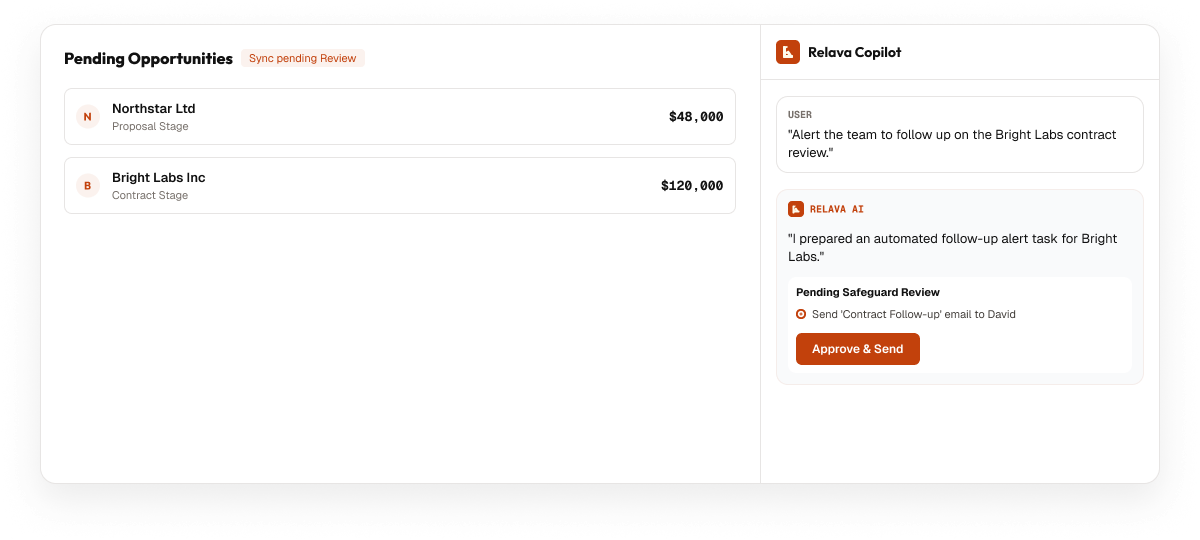
Relava turns everyday requests into useful CRM work—finding context, preparing updates, and asking for confirmation before sensitive actions.
ONE CONVERSATION
You do not need to learn a command language or hunt through every record first.
 What needs my attention today?
Summarize the Bright Labs relationship.
Prepare follow-ups for deals closing this month.
Draft an email to Maya based on our last meeting.
What needs my attention today?
Summarize the Bright Labs relationship.
Prepare follow-ups for deals closing this month.
Draft an email to Maya based on our last meeting.

USEFUL BY DESIGN
Ask about a contact, company, deal, or priority and get a permission-scoped answer.

Turn scattered activity into a clear brief before the next customer conversation.

Draft the next task or email from the relationship history already in Relava.

Prepare typed deal and task updates through ordinary conversation.

When names or records overlap, Relava asks instead of guessing.

Review the exact proposal before material or outward-facing work proceeds.
HUMAN CONFIRMATION
Relava uses the same workspace permissions as the rest of the CRM. It presents sensitive changes clearly, waits for an explicit decision, and keeps important activity visible afterward.
FAQ
Relava can prepare and complete permitted routine work, but sensitive or outward-facing actions are designed to require a clear confirmation first.
No. AI answers and actions are scoped to the same workspace permissions and record visibility rules that apply to you.
Relava returns the relevant candidates and asks you to choose. It does not silently guess which contact, company, or deal you meant.
Yes. Drafted follow-ups and proposed updates remain reviewable and editable before confirmation.
Ask Relava for the context, draft, or next step—and keep the final decision in your hands.